Red-Green-Code

Deliberate practice techniques for software developers

  • Home
  • About
  • Contact
  • Project 462
  • CP FAQ
  • Newsletter

Time Tortoise: Unit Testing Update

By Duncan Smith Leave a Comment May 3 0

Test Explorer

This is one in a series of articles about Time Tortoise, a Universal Windows Platform app for planning and tracking your work schedule. For more on the development of this app and the ideas behind it, see my Time Tortoise category page.

Last week, I added some functionality to filter time segments by start date. Since time trackers generate many time segments over time, it’s not practical to show all of them. The list view would slow down over time.

As always, adding new functionality provides an opportunity to learn more about how the Time Tortoise technology stack works, and I covered some of that last week. However, there’s an inherent conflict between investigating new aspects of the stack, and writing unit tests first. While writing unit tests can help clarify a design, getting a new feature to work sometimes requires some initial experimentation. Integrating this with a test-first approach can lead to a lot of re-writing.

For example, consider the Entity Framework code changes from last week. Because they modified the way time segments are loaded, they required numerous changes to unit tests. But the necessary changes were only apparent after some experimentation with the EF code.

As a result, this week has been focused on fixing unit tests, and adding new ones. Here are some unit test topics from this week’s work.

« Continue »

Time Tortoise: Loading Related Entities with Entity Framework

By Duncan Smith Leave a Comment Apr 26 0

Time Segment Filtering

This is one in a series of articles about Time Tortoise, a Universal Windows Platform app for planning and tracking your work schedule. For more on the development of this app and the ideas behind it, see my Time Tortoise category page.

When you click on an activity in Time Tortoise, the app displays the list of time segments associated with that activity. But you don’t normally want to see every time segment ever recorded for that activity. Instead, it makes more sense to show only the most recent ones, like the segments recorded for the current day. That’s the change I’m making this week.

« Continue »

Time Tortoise: Timers

By Duncan Smith Leave a Comment Apr 19 0

Time Segment Timers

This is one in a series of articles about Time Tortoise, a Universal Windows Platform app for planning and tracking your work schedule. For more on the development of this app and the ideas behind it, see my Time Tortoise category page.

Consider the basic Time Tortoise workflow:

  • Select an activity
  • Start the timer
  • Do some work
  • Stop the timer

This will result in a single time segment that has the appropriate start and end times and is associated with the selected activity. The duration will be calculated and displayed in the Time Segment list view, so you’ll know how much time you spent working. Everything looks good.

But there’s one problem: in order to see your elapsed time, you have to stop the timer. That’s inconvenient. When I’m timing an activity, I like to periodically glance at the timer to see how I’m doing, especially if I’m working towards a time goal.

So it would be nice if the active time segment would update dynamically while the timer was running. That’s the goal for this week.

« Continue »

Time Tortoise: Time Segment Add and Delete

By Duncan Smith Leave a Comment Apr 12 0

Time Segment Add and Delete

This is one in a series of articles about Time Tortoise, a Universal Windows Platform app for planning and tracking your work schedule. For more on the development of this app and the ideas behind it, see my Time Tortoise category page.

Over the past few weeks, I have been implementing time segments. Last week was about editing time segments. This week, it’s adding and deleting, with some digressions on unit testing.

« Continue »

Time Tortoise: XAML Input Validation

By Duncan Smith Leave a Comment Apr 5 0

Time Segment Validation

This is one in a series of articles about Time Tortoise, a Universal Windows Platform app for planning and tracking your work schedule. For more on the development of this app and the ideas behind it, see my Time Tortoise category page.

The typical way to create a time segment in Time Tortoise is to select an activity, start the timer, work on the activity for a while, and then stop the timer. That causes the app to add a time segment to the selected activity, with the appropriate start and end times.

But sometimes you need more control over your time segments. If you’re working on activity A, and someone interrupts you to discuss activity B, you might forget to switch activities. In another instance, you might start timing the wrong activity, and not notice it for a while. Whatever the reason, if you care about timing accuracy (and if you don’t, why are you using a time tracker?) you need a way to manually create, edit, and delete time segments.

This week, I worked on the most basic of these operations, editing an existing time segment.

« Continue »

Time Tortoise: Time Segments in the UI

By Duncan Smith Leave a Comment Mar 29 0

Time Segments 2

This is one in a series of articles about Time Tortoise, a Universal Windows Platform app for planning and tracking your work schedule. For more on the development of this app and the ideas behind it, see my Time Tortoise category page.

Earlier this month, I wrote about time segments, a fundamental part of time tracking. In that article, I described the implementation of the database schema, model, and view model for time segments. This week, I’ll be focusing on the user interface.

« Continue »

Time Tortoise: Visual Studio 2017 Upgrade

By Duncan Smith Leave a Comment Mar 22 0

VS2017

This is one in a series of articles about Time Tortoise, a Universal Windows Platform app for planning and tracking your work schedule. For more on the development of this app and the ideas behind it, see my Time Tortoise category page.

Two weeks ago, Visual Studio 2017 officially launched. Although preview and release candidate versions of VS2017 have been available for almost a year, I have until now been conservatively using VS2015 for my project. But I decided that now is the right time to upgrade. Time Tortoise is still quite small, but it’s getting bigger. And although it can be tricky to work with new tools, VS2017 has had quite a bit of community testing, so I’m not too worried.

Here’s what I found during the upgrade process, which took place over the past week.

« Continue »

Time Tortoise: Time Segments

By Duncan Smith Leave a Comment Mar 15 0

Time Segments

This is one in a series of articles about Time Tortoise, a Universal Windows Platform app for planning and tracking your work schedule. For more on the development of this app and the ideas behind it, see my Time Tortoise category page.

The most fundamental pieces of a time tracker are activities and time segments. Activities are the things you’re working on, and time segments are the times throughout the day when you work on them. I’ve been discussing the implementation of activities for the past few weeks. This week, I’m starting on time segments.

« Continue »

Time Tortoise: Three Test Topics

By Duncan Smith Leave a Comment Mar 8 0

Console

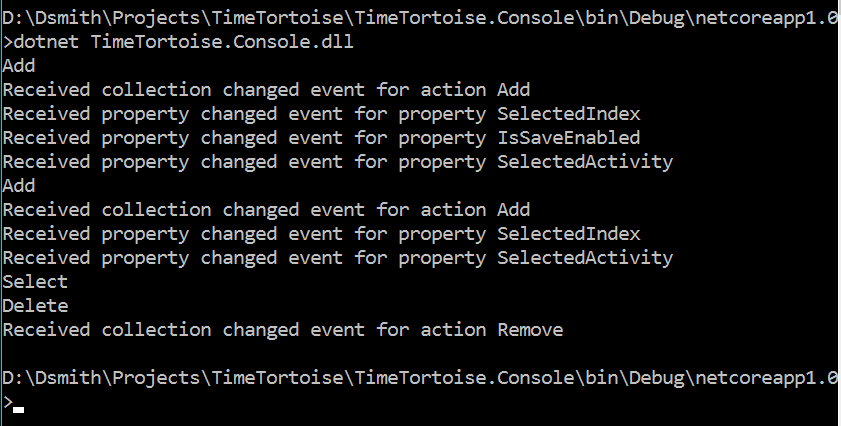
This is one in a series of articles about Time Tortoise, a Universal Windows Platform app for planning and tracking your work schedule. For more on the development of this app and the ideas behind it, see my Time Tortoise category page.

One of the preconditions for using test-driven development is a willingness to spend time figuring out how to test your project in an automated way. Just as research and experimentation is required to get your program to do what you want, TDD requires research and experiments that lead to test code.

This week, I have three test topics: testing UI behavior without a UI, using a console application for testing, and testing time-related features.

« Continue »

Time Tortoise: Code Coverage

By Duncan Smith Leave a Comment Mar 1 0

Code Coverage

This is one in a series of articles about Time Tortoise, a Universal Windows Platform app for planning and tracking your work schedule. For more on the development of this app and the ideas behind it, see my Time Tortoise category page.

A key part of test-driven development (TDD) is writing unit tests first, and then writing the code that makes them pass. The benefits of the test-first approach, as explained in an Extreme Programming article from 2000, are still relevant 17 years later:

  • You don’t have to make time to write tests later (assuming you remember to write them later).
  • You have to understand the requirements before you write the code.
  • You know when you’re done writing each section of code (because the tests pass).
  • You’re less likely to build functionality that you don’t need, since writing each test makes you think about the value of the use case that you’re implementing.

These are all real benefits, and test-first is a good approach in many cases. However, there’s a common scenario where it’s difficult to follow test-first strictly. Consider my Time Tortoise project. Since I’m making up my own requirements, it’s easy to come up with use cases and think about what tests I should use to verify them. But some tests need to call low-level methods, so they require a clear understanding of the technology stack. If you’re learning a new technology (as I am with UWP), you may need to experiment with several ideas before you know what kind of code will be required to implement a use case. When you’re in that phase of your solution development, it may not make sense to follow the test-first approach.

Here are some examples from my Time Tortoise work this week.

« Continue »

  • « Previous Page
  • 1
  • …
  • 36
  • 37
  • 38
  • 39
  • 40
  • …
  • 50
  • Next Page »

Stay in the Know

I'm trying out the latest learning techniques on software development concepts, and writing about what works best. Sound interesting? Subscribe to my free newsletter to keep up to date. Learn More
Unsubscribing is easy, and I'll keep your email address private.

Getting Started

Are you new here? Check out my review posts for a tour of the archives:

  • 2023 in Review: 50 LeetCode Tips
  • 2022 in Review: Content Bots
  • 2021 in Review: Thoughts on Solving Programming Puzzles
  • Lessons from the 2020 LeetCode Monthly Challenges
  • 2019 in Review
  • Competitive Programming Frequently Asked Questions: 2018 In Review
  • What I Learned Working On Time Tortoise in 2017
  • 2016 in Review
  • 2015 in Review
  • 2015 Summer Review

Archives

Recent Posts

  • Will AI Coding Assistants “Deskill” Us? January 30, 2026
  • Stateless by Design: How to Work With AI Coding Assistants December 31, 2025
  • Do Coding Bots Mean the End of Coding Interviews? December 31, 2024
  • Another Project for 2024 May 8, 2024
  • Dynamic Programming Wrap-Up May 1, 2024
  • LeetCode 91: Decode Ways April 24, 2024
  • LeetCode 70: Climbing Stairs April 17, 2024
  • LeetCode 221: Maximal Square April 10, 2024
  • Using Dynamic Programming for Maximum Product Subarray April 3, 2024
  • LeetCode 62: Unique Paths March 27, 2024
Red-Green-Code
  • Home
  • About
  • Contact
  • Project 462
  • CP FAQ
  • Newsletter
Copyright © 2026 Duncan Smith