Red-Green-Code

Deliberate practice techniques for software developers

  • Home
  • About
  • Contact
  • Project 462
  • CP FAQ
  • Newsletter

Time Tortoise: Idle Time User Interface

By Duncan Smith Leave a Comment Jul 12 0

Idle Time

This is one in a series of articles about Time Tortoise, a Universal Windows Platform app for planning and tracking your work schedule. For more on the development of this app and the ideas behind it, see my Time Tortoise category page.

After several weeks of infrastructure work, it’s finally time to make the idle time feature available in the Time Tortoise UI.

« Continue »

Time Tortoise: Idle Time Detection with MouseKeyHook

By Duncan Smith Leave a Comment Jul 6 0

MouseKeyHook

This is one in a series of articles about Time Tortoise, a Universal Windows Platform app for planning and tracking your work schedule. For more on the development of this app and the ideas behind it, see my Time Tortoise category page.

A practical time tracker needs to take into account user idle time, but it isn’t possible to do that using UWP. So for the past few weeks, I have been working on a companion app that will provide the main UWP app with information, like idle time, that it can’t get on its own. The SignalR-based communication infrastructure is now done, so this week I worked on the idle time detection.

« Continue »

Time Tortoise: Minimal SignalR Functionality

By Duncan Smith Leave a Comment Jun 29 0

Signal

This is one in a series of articles about Time Tortoise, a Universal Windows Platform app for planning and tracking your work schedule. For more on the development of this app and the ideas behind it, see my Time Tortoise category page.

Last week, I covered the reason for using SignalR in Time Tortoise, and how SignalR can be used to build a simple chat application. This week, I’ve been working on integrating minimal SignalR functionality into the Time Tortoise codebase.

« Continue »

Time Tortoise: Using SignalR with UWP

By Duncan Smith Leave a Comment Jun 22 0

SignalR

This is one in a series of articles about Time Tortoise, a Universal Windows Platform app for planning and tracking your work schedule. For more on the development of this app and the ideas behind it, see my Time Tortoise category page.

To communicate with its companion app, Time Tortoise needs to use sockets. In recent weeks, I have been experimenting with socket communication between a UWP client app and a server running in a console app. This architecture works when everything is set up and running as intended. But it can be tricky to make sockets robust. So this week I’m looking into adding a layer that makes sockets easier to use and more resistant to unexpected failures.

« Continue »

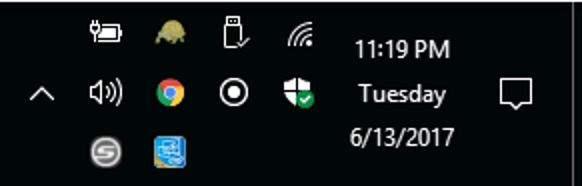
Time Tortoise: Notification Icon

By Duncan Smith Leave a Comment Jun 14 0

Notification area

This is one in a series of articles about Time Tortoise, a Universal Windows Platform app for planning and tracking your work schedule. For more on the development of this app and the ideas behind it, see my Time Tortoise category page.

To build a companion app that implements functionality that a UWP app can’t, it’s necessary to pick a non-UWP technology to use. Here are a few options:

  • A Windows service: Since the Time Tortoise Companion App only needs to send messages to and receive messages from Time Tortoise, it may not require a user interface. A Windows service allows code to run in the background on Windows, without a UI. I have a couple of concerns with this approach: 1) It’s a bit unfriendly, especially for users unfamiliar with Windows services, to have a mysterious service running in the background; and 2) I may find a need for a companion app UI in the future. This is not in itself a good enough reason to avoid the Windows service approach, but it’s a strike against it.
  • A Windows Forms app: This solves both of the concerns with the Windows service. But there’s no reason to use this ancient UI framework for a brand new app, when there are other options available.
  • A Windows Presentation Foundation app: WPF isn’t as cutting-edge as UWP, but it uses the same UI markup language (XAML). And since it is widely used, it’s likely to support any functionality that I need. So that’s what I’m going with for the companion app.

« Continue »

Time Tortoise: A Companion App

By Duncan Smith Leave a Comment Jun 7 0

Pipes

This is one in a series of articles about Time Tortoise, a Universal Windows Platform app for planning and tracking your work schedule. For more on the development of this app and the ideas behind it, see my Time Tortoise category page.

Last week, I brought up some limitations of UWP apps, including one that will affect Time Tortoise. I also suggested the idea of a companion app that could address these limitations. This week, I’ll start exploring the companion app in more detail.

« Continue »

Time Tortoise: Working Around UWP Limitations

By Duncan Smith Leave a Comment May 31 0

UWP 669

This is one in a series of articles about Time Tortoise, a Universal Windows Platform app for planning and tracking your work schedule. For more on the development of this app and the ideas behind it, see my Time Tortoise category page.

I decided to use the Univeral Windows Platform for Time Tortoise because I’m targeting Windows, and because UWP is the direction that the Windows user interface is moving (as of 2017). However, I knew from the beginning that UWP would not have all of the functionality of more established options like Windows Presentation Foundation. So as I make design decisions, I also look for ways to avoid getting stuck due to UWP limitations.

« Continue »

Time Tortoise: Creating an App Package

By Duncan Smith Leave a Comment May 25 0

Package

This is one in a series of articles about Time Tortoise, a Universal Windows Platform app for planning and tracking your work schedule. For more on the development of this app and the ideas behind it, see my Time Tortoise category page.

Last week I covered some of the requirements for self-hosting Time Tortoise. The next step is to package and deploy a self-hosted version of the app, without disrupting the ability to run it in debug mode in Visual Studio.

« Continue »

Time Tortoise: Self-Hosting

By Duncan Smith Leave a Comment May 17 0

Assets

This is one in a series of articles about Time Tortoise, a Universal Windows Platform app for planning and tracking your work schedule. For more on the development of this app and the ideas behind it, see my Time Tortoise category page.

As I mentioned last week, Time Tortoise is almost at the point where it could be used as a rudimentary time tracker. However, it still needs a number of improvements before I would want to use it instead of my regular time tracker.

As I’m adding features to Time Tortoise, it’s important to add them in priority order. In other words, add the most useful features first. This ensures the best use of time, and avoids throwing in features without a good reason.

« Continue »

Time Tortoise: An Early Fit and Finish Pass

By Duncan Smith Leave a Comment May 10 0

Fit and Finish

This is one in a series of articles about Time Tortoise, a Universal Windows Platform app for planning and tracking your work schedule. For more on the development of this app and the ideas behind it, see my Time Tortoise category page.

Although far from done, Time Tortoise now has some basic functionality for tracking work time:

  • Add, remove, and edit activities (the things you work on).
  • Start and stop an activity timer, which creates a time segment (a start and end date/time).
  • Manually add, remove, and edit time segments.
  • Show the time segments associated with the selected activity.
  • Filter the list of time segments by start date.

You could in theory use these features for tracking real work, but there’s a lot missing. However, before moving on to add more features, I spent some time this week on fit and finish.

« Continue »

  • « Previous Page
  • 1
  • …
  • 35
  • 36
  • 37
  • 38
  • 39
  • …
  • 50
  • Next Page »

Stay in the Know

I'm trying out the latest learning techniques on software development concepts, and writing about what works best. Sound interesting? Subscribe to my free newsletter to keep up to date. Learn More
Unsubscribing is easy, and I'll keep your email address private.

Getting Started

Are you new here? Check out my review posts for a tour of the archives:

  • 2023 in Review: 50 LeetCode Tips
  • 2022 in Review: Content Bots
  • 2021 in Review: Thoughts on Solving Programming Puzzles
  • Lessons from the 2020 LeetCode Monthly Challenges
  • 2019 in Review
  • Competitive Programming Frequently Asked Questions: 2018 In Review
  • What I Learned Working On Time Tortoise in 2017
  • 2016 in Review
  • 2015 in Review
  • 2015 Summer Review

Archives

Recent Posts

  • Will AI Coding Assistants “Deskill” Us? January 30, 2026
  • Stateless by Design: How to Work With AI Coding Assistants December 31, 2025
  • Do Coding Bots Mean the End of Coding Interviews? December 31, 2024
  • Another Project for 2024 May 8, 2024
  • Dynamic Programming Wrap-Up May 1, 2024
  • LeetCode 91: Decode Ways April 24, 2024
  • LeetCode 70: Climbing Stairs April 17, 2024
  • LeetCode 221: Maximal Square April 10, 2024
  • Using Dynamic Programming for Maximum Product Subarray April 3, 2024
  • LeetCode 62: Unique Paths March 27, 2024
Red-Green-Code
  • Home
  • About
  • Contact
  • Project 462
  • CP FAQ
  • Newsletter
Copyright © 2026 Duncan Smith